Taking It To The Next Level
Now you’re sharing with the neighbors and
surfing from the park, what’s next? So glad you asked! How’s
this for starters:
Traffic plotting—Track
your network usage over time. Maybe it’s time to upgrade your
connection, or block that neighbor downloading movies 24
hours a day.
Do-it-yourself access point—Why
buy something off-the-shelf when you can pay twice as much to
build it all yourself (but have a lot more fun doing it)?
There isn’t enough space to cover these topics in detail,
but here are some pointers to get you
started.
Traffic Graphing
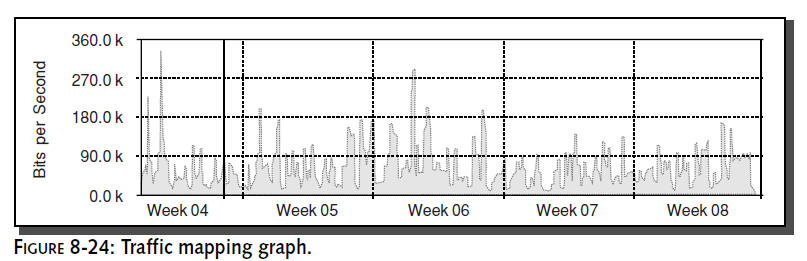
Some access points support Simple Network
Management Protocol (SNMP) and use it to provide basic traffic
statistics.With the right software, you can retrieve these
statistics and log them over time to produce graphs like the one
shown in Figure 8-24. In this residential wireless LAN, traffic
peaks each evening after work. Business hours are the best times
for large downloads.
The classic free server software for producing
graphs is Multi Router Traffic Grapher (MRTG)
at
http://people.ee.ethz.ch/~oetiker/webtools/mrtg/.
It’s still popular, though its
more powerful successor RRDtool is gaining
ground via add-ons such as Cacti (
www.raxnet.net/products/cacti/).
Do-It-Yourself Access Point
A typical consumer access point consists of a
custom-designed computer board running a low power (though
high-speed) Million Instructions Per Second (MIPS) processor, a
stripped-down radio card, and some fancy custom software. With a
little time and exploration, you can build something with much
greater capabilities, including more power, more fine tuning
possible, and extra features only limited by your skill and
imagination.
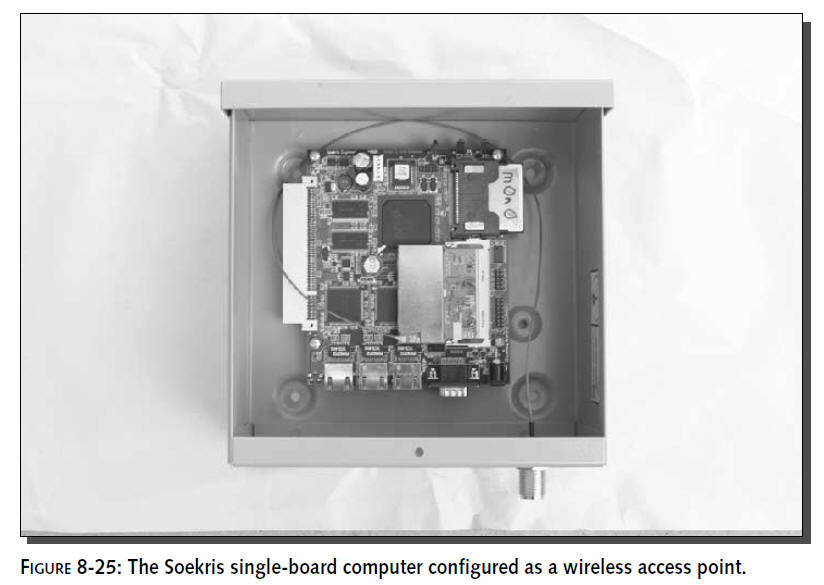
One popular alternative to off-the-shelf access
point hardware is the Soekris single board computer using a
mini-PCI wireless card (see Figure 8-25).With some special
software, a little configuration and a PoE adapter, this board
becomes a professional-grade access point.
DIY Hardware
The logical hardware for a homebrew access point
is a PC-based architecture. They’re cheap, plentiful, and well
supported with free software. An abandoned 486 computer with a
tiny hard disk will be more than sufficient to make a powerful
access point. However, if you really want bragging rights at
your next geek meeting, then take a look at custom “single-board
computers” that strip out all the unnecessary PC parts like
video and keyboard support, video display and hard disk drive
controllers. Some manufacturers of these and
similar hardware are:
www.soekris.com
www.pcengines.ch
www.mikrotik.com
www.openbrick.org
They use a compact flash card as a hard disk and
thus have no moving parts, are very low power, and run silently.
You’ll need to add a radio card for wireless support.Wireless
radio cards previously come packaged as PC cards (also known as
PCMCIA cards). But with the addition of wireless support to
laptops, they’re also readily available in a “mini-PCI” format,
which is slightly cheaper and somewhat smaller.
When choosing a radio card, you can buy one with
more power than a standard laptop wireless card supplies.
Generally, laptop cards output 30–50mW of power, but you can buy
cards up to 200 mW which can double your range. One popular
brand amongst DIY builders is called Senao and is made by
Engenius. Use a good search engine to find suppliers, or check
with the supplier of your other specialized wireless gear
(antenna, pigtails, and so on).
DIY Software
Cool hardware is an expensive (and lousy) boat
anchor without software to go with it. Many consumer access
points use Linux underneath, and you can too. There are many
free distributions tailored specifically for building wireless
access points. They include:
M0n0wall—
www.m0n0.ch/wall
Pebble—http://nycwireless.net/pebble
WISP-Dist—http://leaf-project.org/
There are also some popular commercial suppliers
of reasonably priced access point software:
RouterOS—www.mikrotik.com
StarOS—www.star-os.com
More DIY Resources
Many Web sites discuss different aspects of
building your own access point. Some starting points:
www.socalfreenet.org/standardap—comprehensive
design and description for a wireless access point used in a
community network
www.nycwireless/poe—how
to build a PoE adapter from $10 worth of parts for your existing
access point
www.seattlewireless.net—a
treasure trove of hardware comparisons, specs, and
vendors
www.socalwug.org—wireless
projects, reviews, and vendor presentation videos
There are also many active mailing lists where
DIY-related information appears regularly,
including BAWUG and ptp-general from
www.bawug.org
and
www.personaltelco.net/,
respectively.
Related DIY Projects
Consumer access point hardware is hard to beat
on price, so some people prefer to improve
them instead of starting from scratch. Some
popular access points to hack are:
Linksys wap-11 and wet-11—hacks include replacing the radio card
with a more powerful version, as well as modifying the hardware
to support more PoE options Apple Airport—the first true
consumer access point Linksys
WRT54G—this runs Linux, so enthusiasts are hard at work with new
firmware that provides new functionality
Some creative searching online will reveal similarly
fascinating projects and ideas. Have fun
hacking!
Summary
Building and installing an outdoor access point
can extend your wireless coverage far beyond what’s possible
indoors. This creates exciting opportunities for sharing your
coverage with other people or creating completely new uses.
This chapter provided a lot of information to
get you started. You’ve learned how to think about location.
There’s a detailed list of what equipment to buy and the
inherent trade-offs that are necessary. Clever innovations like
Power-over-Ethernet simplify your installation. Putting
everything together isn’t as simple as it appears. Planning for
cooling, weatherproofing, and lightning are important to
increase the reliability and safety of your installation.
This may just be the beginning of even more
ambitious projects.Take some of the ideas from this chapter and
build on them to see how far you can get. Read on to create the
ultimate outdoor wireless access point using solar power. The
next chapter will show how to take a 75 W solar panel and create
a completely stand-alone, totally wireless access point and
repeater system. This system can be placed 10 miles or more from
the nearest DSL line and doesn’t require any power lines.