The virtual tour is difficult to name
accurately, but a simple concept: location-aware digital content
is delivered to visitors to a space in the real world. This can
be done with special equipment as is being done by experimenters
in the Netherlands. Or you can set up a virtual tour yourself
with a few access points and a Web site.
Employ the Web site to give guided tours of the
local area. Foot traffic with a wireless PDA or laptop will
discover a locally installed access point, obtain an IP address,
and load a Web page with content about the local surroundings.
The visitors can surf to the Web site manually, or use a captive
portal system (like that shown in Chapter 10) to direct users to
visit the appropriate Web page.
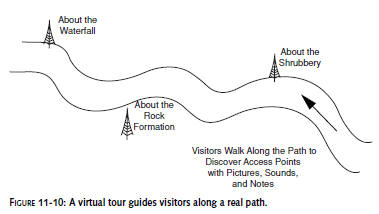
Figure 11-10 shows a diagram of a virtual tour.
Access points are placed in strategic locations to deliver
content about the surroundings.
This can be done for parkland tours, historic
neighborhood facts, walk-throughs of museum grounds, and any
other form of locally-based content. Virtually any self-guided
tour could be delivered over a wireless network access point.
And location-aware content brings the tourist on-site in the
real world and the digital world in a single moment.
Finding an Edge in Competition
When you’re getting started in AP gaming, just
about any software will do the job. But what do you do when
winning becomes your determined goal? Here we will discuss some
of the finer points of software choice and how it relates to AP
games.
The software choices available are often defined
by the operating system used on your computer. When choosing the
software and operating system for your platform, you want to
choose an OS that fits within your current support network of
technically savvy friends and associates. Being a lone-adopter
can be trying when you’re attempting to install a new network
driver at 2:00 in the morning.
The two popular choices for access point
detection are the same as for war driving: Linux running Kismet,
and Windows running NetStumbler. There are advantages to Linux
in its low cost to implement and huge amount of free, opensource
software available.Windows also boasts a long history of
easy-to-use software that’s easy to obtain and install.
Linux users can run the Kismet Wireless scanner,
the gold standard of free war driving software. Kismet is quite
powerful, but setting it up is not trivial. It requires
obtaining, compiling, installing, and configuring several
packages with little direct support. This is where your personal
technical support network comes in handy.
Windows users can download and install
NetStumbler. NetStumbler requires little effort to get working
as compared to Kismet. Some users are able to download, install,
and run NetStumbler in a few clicks. NetStumbler is the
easy-entry war driving software. Although Kismet is more
powerful, most wardrivers still choose to run NetStumbler. See
Chapter 6 for more on NetStumbler.
Although Windows/NetStumbler users can use a GPS
and mapping software in conjunction with NetStumbler, it is
important to note that NetStumbler only pinpoints your GPS
coordinates during scanning. Linux users may find themselves at
an advantage, in this case, by using Kismet and GPSDrive/Gpsd,
which allows a user to pinpoint the actual location of an access
point in realtime based on multiple Signal-to-Noise Ratio
readings along with GPS coordinates. The result of this
on-the-fly logging is superior accuracy and speed when
pinpointing access points.
NetStumbler is designed to identify access
points within a given range. It detects them by transmitting and
receiving beacon signals, which are then in turn used to
synchronize communication along the network.
NetStumbler users can use a program called
StumbVerter, available atwww.sonarsecurity.com,
which converts NetStumbler log files to create plotted maps
based upon their coordinates.
Unfortunately, it requires Microsoft’s MapPoint, a fairly
expensive mapping tool (see Chapter
7 for more on MapPoint and NetStumbler).
Kismet is not only able to detect access points
through Signal-to-Noise Ratio graphs, but is also able to sniff
packets. You can use GPS mapping plug-ins to automatically
triangulate the actual GPS coordinates of an access point. You
may also view Signal-to-Noise Ratio graphs in
real time. A “hot/cold” system is able to
automatically track optimum signal and the approximate location
of the access point. Additional plug-in software is available to
switch between location mapping and access point locating tasks.
Kismet has been designed with the intentions of
seamless interaction with the GPSDrive software, thus creating
powerful maps in real time, on-the-fly, from the data recorded
during the session. Access points are plotted in their
approximate location for easy identification, through the use of
either custom or pre-made maps downloaded off the Internet.
In order to fully utilize the capabilities of
Kismet, you should have the latest version of the software
installed on your PC. The latest version can be found at
www.kismetwireless.net/.
Summary
This chapter has introduced you to several ways
of using wireless access points, as more than just a way to get
on the Internet. Playing Fox Hunt,Treasure Hunt, Capture the
Flag, and creating Virtual Tours are pushing access point
functionality to its limits in a way never intended by the
manufacturer. Using an access point in the manner described here
is on the cutting edge and can only become more interesting.
Access point gaming is continually increasing in
popularity and, with wireless technology becoming more and more
widespread, you can count on access point gaming being a vital
part of recreation using wireless equipment.
Read on to Chapter 12 and discover how to add a
wireless Internet connection to your TiVo digital video
recorder. Download program updates without a telephone line.
Subscribe to the TiVo Home Media Option and stream music to your
entertainment center over the TiVo. Create a slideshow and
transfer movies from one TiVo DVR to another in a different part
of the house, all using your in-home wireless network and TiVo.