Fitting the Radiating Element
One of the most important parts of the antenna
is the radiating element.While different shapes will change the
way the antenna works, its signal strength, and its efficiency,
it is not super critical if you do not get it bang on. The
radiating element can be of three shapes (see Figure 3-9):
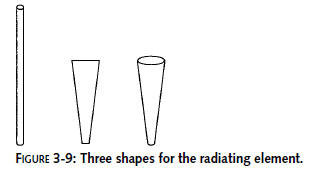
While the cone shape is the most efficient, it
is also the hardest one to make. So, we will only go into detail
for the round element and wedge element. The round element is
very simple to make since it is simply the core copper conductor
from an LMR-400 coaxial cable (used extensively in Chapter 1).
The round element also has the most narrow frequency band. If
you create an antenna using the round element, effective power
will drop considerably across all of the channels.
The wedge element is a bit more complex to make,
but it has great coverage of the Wi-Fi channels. It’s a little
less efficient than the cone, but not significantly. The wedge
is worth the extra time and effort, and it’s what we use when
playing with the can antenna toy.
The cone element follows closely with the wedge
shape in dimensions. If you want to try to make one, use the
same dimensions and spacing as the wedge (6 mm diameter at the
top, 1 mm diameter at the bottom).
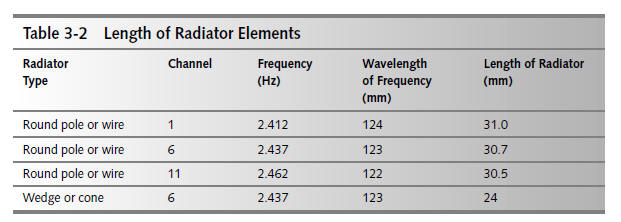
The length of the radiating element is important.Table
3-2 shows specific lengths for your
radiating element. Note that can dimensions do not factor into
the element size. With our wedge
antenna, we needed the radiating element to be 24 mm in length.
Figure 3-10 shows how to measure
the radiating element.
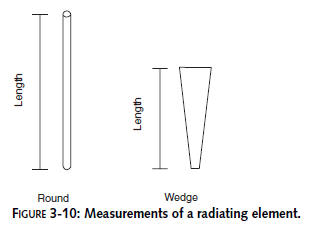
Radiator element length is measured from the end
of the connector jack, not the length of the piece of copper
alone. Wait to make the final cut until after soldering the
connector in place and measuring the connector and element
together.
A Round Radiating Element
Making the round radiating element is extremely
simple because it is the core copper conductor from a coaxial
cable.To make the round radiating element, follow these steps:
Step 1: Cut Too Much
Once you know the length of the radiating
element, you will need to make sure you have the correct length.
Having said that, make sure that you don’t trim the coaxial
cable to the exact length of the element. Instead, cut extra.
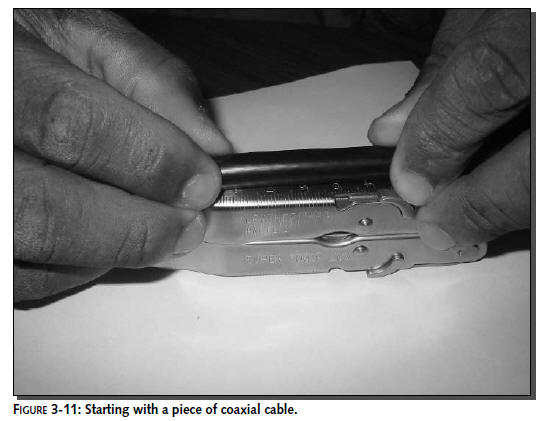
Starting with a piece of coaxial cable that is twice the final
length is a good starting point, as shown in Figure 3-11.
Step 2: Strip the Insulation
Using a single-sided razor blade, strip the
outer jacket, inner shield, and dielectric core as described in
Chapter 1. As Figure 3-12 illustrates, you will be left with
just the core copper
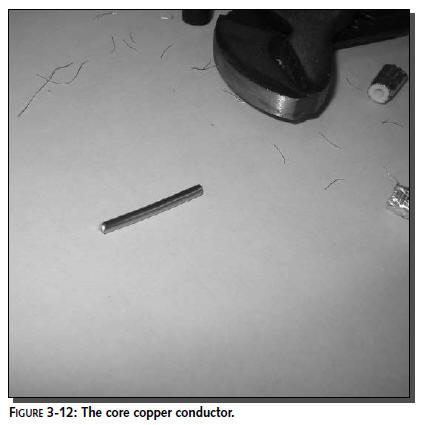
conductor. Make sure that you add a little bit
to the length of the connector with respect to the length
determined in Table 3-2, to make sure that the radiating element
can be inserted and soldered into the N-Connector.
Step 3: Cut to Length
Now that you have the core conductor to work
with, start by trimming one side as square with the edge as
possible. Then measure the desired distance from that trimmed
edge and cut the final length. Ensure that you take into account
the portion of the conductor that will fit into the N-Connector
body. If you are not sure about the length, wait until after you
solder the conductor into the body before making any final
length adjustments.
A Wedge Radiating Element
Making a wedge radiating element is not a
complex process but it does take some talent to solder it to the
connector. To cover the Wi-Fi spectrum, the wedge radiating
element needs to be 1 mm wide at the base (where it connects to
the N-Connector) and 6 mm at the tip. Figure 3-13 shows the
wedge.
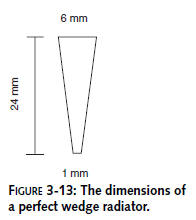
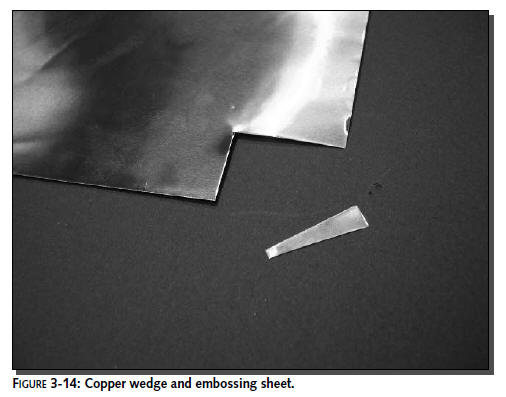
One way to make this wedge is to start with a
copper embossing sheet (this is available in most arts and
crafts stores). Simply trace out the desired wedge shape of the
radiating element and cut to size with either a knife or strong
scissors.We created the wedge in Figure 3-14 using the one
foot-square copper embossing sheet.
A second way to make this wedge shape is to use
a hammer to hammer out the shape. As you can imagine, this
process is more work-intensive, but requires less precision on
your part. The object in Figure 3-15 is a cross between the
wedge and round element. The forgiving nature of this antenna
design allows for a good bit of fudging.
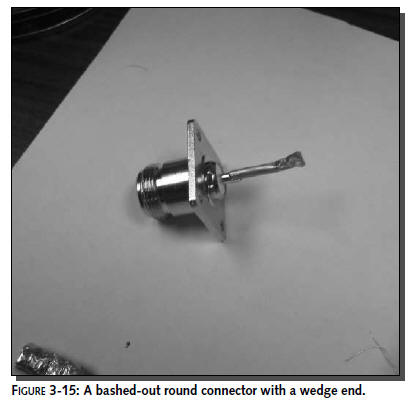
This process produces a semi-wedge-shaped
element that is not as efficient as the “true” wedge radiating
element, but is better than the round radiating element.