Trying It Out
Those trick-or-treaters are probably lumbering
up your street as we speak, so get your pumpkins set up and
working to give them a proper scare.
Follow these steps to operate the scary
pumpkins:
1. Press the on/off switch of the talking
pumpkin to turn it on.
2. Press and hold down the record switch and
speak your greeting.
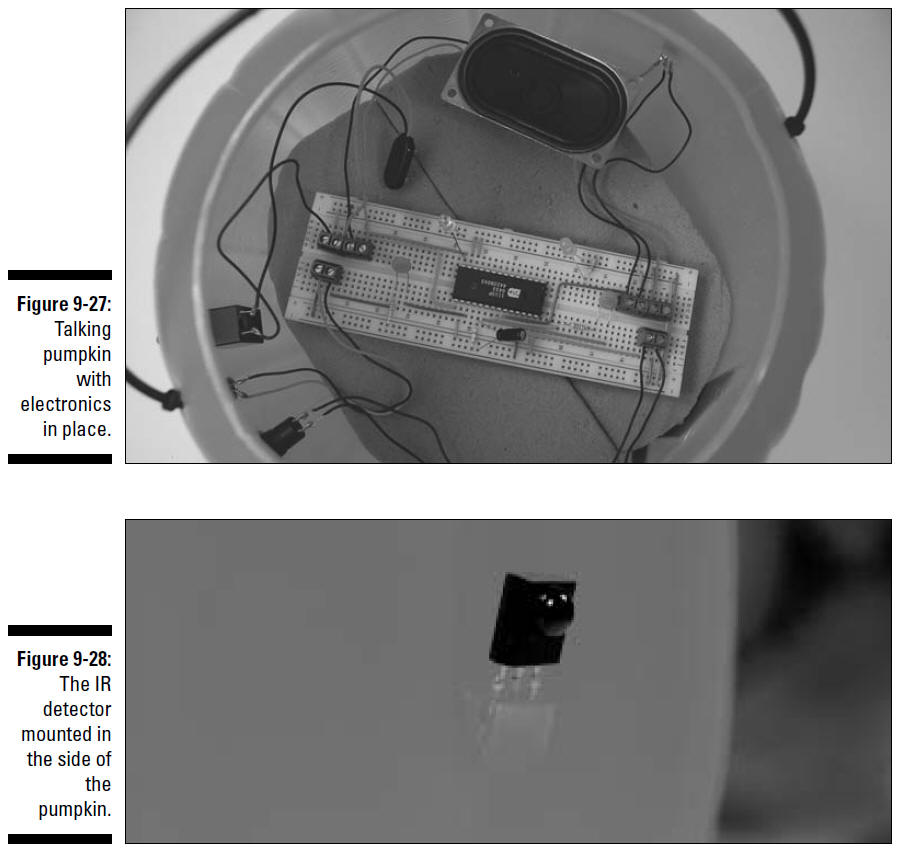
Black wire from microphone
Red wire from microphone
Black wire from ground pin of IR detector
Red wire from IR detector
Black wire from Vout pin of IR detector
Wire from on/off switch
Wires from speaker
Red wire from battery pack
3. Place the talking pumpkin on one side of your
entryway (just inside, or safely out of the rain because these
are not waterproof) and place the silent pumpkin on the other,
with the IR LED facing the IR detector.
4. Flip the on/off switch of the silent pumpkin
to On and adjust the potentiometer until the talking pumpkin
starts talking.
5. Wait for your guests to walk between the
pumpkins, and watch them scatter in fear (or laugh in delight)
when the pumpkins sound off.
Here the obvious things to check out if you’re
having a problem:
All
the batteries are fresh, are tight in the battery pack, and face
the right direction.
No
bare wires near the microphone or IR detector touch each other.
If you need to troubleshoot your circuit beyond
the obvious, here are some
options:
See
whether the LEDs are inserted backward or are burned out.
If
the sound isn’t loud enough, go with a 4 ohm, 1 watt or greater,
speaker.
If
nothing’s shaking, make sure the IR detector wires are connected
to the correct terminal block pins.
Make sure that the IC isn’t backward.
To test that the circuit in the silent pumpkin
works, place a standard LED into the circuit instead of an IR
LED. If you get a light, try a different IR LED or check the
connection to the IR LED.
Taking It Further
Aren’t talking pumpkins just so cool? (Sounds
like a rap group, now that we think of it!) You can morph these
guys into something else or expand their functionality in a few
different ways:
Obviously, you can change the containers for this light and
sound event to whatever your heart
desires. Plastic Santas, scarecrows, or firecrackers
come to mind.
You
could have a one-two punch scenario for your pumpkins: One sound
goes off when somebody steps into the beam, and another
sound hits when somebody steps out
of it. You need a receiver and transmitter in
each pumpkin. Then connect the signal output of the IR
detector to Pin 23 of the voice
chip in a receiver circuit in one pumpkin, and Pin 24 of
the voice chip in the receiver circuit of the other
pumpkin.
Try
using a voice synthesizer chip. Instead of recording your own
message, buy a voice synthesizer
chip, such as the one we use in Chapter 7.
This allows you to put together custom sound
effects such as a rocket blasting off, a bit of Beethoven’s
Ninth Symphony, or a red alert alarm when somebody interrupts
your IR beam.